
Medically reviewed by : Dr. Neha Narula
[Qualification : Head of Physiotherapy & Rehabilitation • 10+ years of experience]
[Specialty: Physiotherapy & Rehabilitation ]
[Registration No : – IAP-31212]
[Clinic: StepUp Joints, Lajpat Nagar, South Delhi]
Last reviewed:- [21 – November -2026]
Doctor’s Statement
“Tech-neck and desk-related posture problems are often linked to prolonged screen use, limited movement, and poorly adjusted workstations. Effective posture correction is not about maintaining a rigid posture throughout the day; it involves improving mobility, strengthening supportive muscles, optimizing your workstation, and taking regular movement breaks. A personalized physiotherapy programme can help people develop healthier movement habits and reduce the strain associated with prolonged desk work.”
Summary
Tech-Neck to Desk-Slouch: Physiotherapist-Approved Ergonomic Correction Drills explains how prolonged screen use, poor sitting habits, and an unsuitable workstation can contribute to neck stiffness, rounded shoulders, and upper-back discomfort. Guided by Dr. Neha Narula (PT), Head of Physiotherapy & Rehabilitation, the article covers practical posture correction exercises, ergonomic workstation setup, cervical spine mobility, strengthening drills, movement breaks, and preventive strategies to support healthier desk-work habits.
What Is Tech-Neck?
“Tech-neck” is a popular name for the uncomfortable sensation of the neck and the regions around it. It can be caused by looking at a phone, laptop, tablet, or any other screens. They are often too low or too far, so people tend to crane their necks to get a better view.
This issue is not limited to just one poor technique. Spending too long in fixed positions with inadequate movements puts extra strain on the cervical spine, shoulders, and upper back.
Some of the most common symptoms, that cause the need for the intervention are:
- Stiff neck
- Upper back and shoulder tension
- Reduced range of motion in the neck
- Cervical muscle fatigue
- Headaches caused by these issues
- Numbness and tingling in the affected area
These conditions are not always the result of improper body mechanics. The issue can exist independently or be part of a more significant condition that requires imaging or physical therapy.
How Desk Work Can Affect Posture
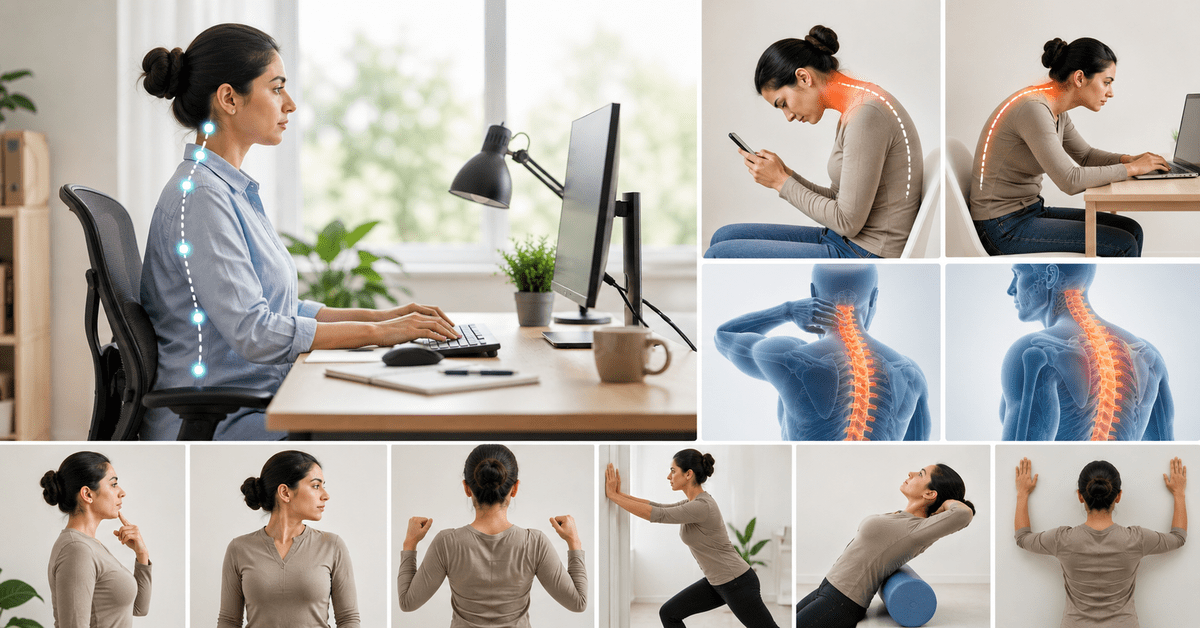
A standard work desk encourages a person to adopt a number of bad postures:
- Typing on the laptop while leaning forward
- Holding the phone between the shoulder and the ear
- Throwing the shoulders back while typing
- Upper back rounding
- Tilting the head forward
- Sitting at the same spot for prolonged periods without a break
- Working out continuously without giving the body a rest
While these postures may be comfortable to maintain, you should avoid sustaining them for a prolonged period. The best way to achieve good posture is to break these habits and move around more often.
Forward Head Posture and Cervical Spine Mobility
The head is held upright by the neck bones (cervical spine) and the muscles around the neck and upper back. When we repeatedly look down at a computer screen, these muscles have to work harder to keep the head upright.
As a result, some patients find that they have reduced movement of the neck or tighter muscles.
Physiotherapy for the Cervical Spine aims at assessing and treating any restriction in normal neck movement and helping to strengthen the muscles that support the spine and allow us to move freely without pain.
Depending on your symptoms, physiotherapy may include:
- Cervical mobility exercises
- Thoracic spine mobility
- Deep neck flexor strengthening
- Scapular stabilisation
- Shoulder mobility
- Postural awareness
- Ergonomic advice
- Functional strengthening
The type of treatment will depend on your particular problems and will take into account your general health and work and recreational activities.
Ergonomic Workstation Setup: Where Should You Start?
Exercise alone may not correct a bad posture caused by the frequently repeated movements at the workstation.
Ergonomic workstation should enable you to work without constantly leaning forward, looking down, and raising your shoulders.
1. Set the screen to a comfortable viewing height
The top of the monitor should be at or slightly below eye level so that you do not have to continually lower your head to see the screen.
If you use a laptop for prolonged work periods, use a laptop stand and separate keyboard and mouse.
2. Set the screen to a comfortable distance
Position the screen so that it is simple to read without leaning forward.
If you constantly find yourself leaning your head and body forward to look at the screen, you may need to enlarge the text on the screen or move it closer.
3. Support your lower back
Your chair should provide adequate support for the length of your back.
Make sure that your feet are firmly planted on the floor or on a footrest.
4. Keep your shoulders relaxed
Do not tense your shoulders when you type or use the mouse.
Position the keyboard and mouse so that your elbows are close to your body.
5. Do not sit for too long
Even the most well-designed workstation cannot compensate for prolonged sitting.
Get up and stretch or change your posture every hour or so.
Physiotherapist-Approved Posture Correction Drills
The following exercises may benefit people who spend long hours working at a desk due to the resulting tightness in the muscles. Everyone must perform them comfortably and stop if there is intense pain or other concerning symptoms like lightheadedness, numbness, etc.
1. Chin Tuck
One can sit or stand comfortably while looking forward.
Now, tuck the chin inwards gently as if making a double chin without tilting the head down.
Hold for a while before releasing and repeat.
This action helps to loosen the ligaments and underlying deep muscle tissues in the neck region.
2. Neck Rotation
Sit up nice and tall, then slowly turn the head to one side.
Return to the centre and repeat on the other side.
Only do it as much as is comfortable instead of twisting the neck.
It will help to keep the flexibility of the neck muscles.
3. Thoracic Extension
Sit on a chair with hands placed comfortably.
Gently lean back with the upper back over the back of the seat as if trying to touch the top of the head to the back of the chair.
Then slowly return to the starting position.
This movement will aid in keeping the spine’s flexibility.
4. Shoulder Blade Retractions
Sit or stand comfortably, then gently draw the shoulder blades together and down like making a heart shape with the shoulders without raising the shoulders up towards the ears.
Hold for a while before releasing.
The shoulder blades will be activated, strengthening and loosening the upper back muscles.
5. Wall Angels
If comfortable, stand with the back to a wall.
Now, bring the arms against the wall as high as possible and slowly move them up and down.
Avoid making the shoulders sore or hurt if it becomes uncomfortable.
It will help loosen the muscles of the middle back while stretching the front chest muscles.
6. Doorway Chest Opener
Standing in a doorway with the forearms resting on the top of the frame.
Now, slowly step forwards until the chest opens up as a stretch.
Avoid bouncing or forcing the stretch.
This movement helps to loosen the chest muscles that tend to tighten while hunching at work.
7. Seated Upper Back Rotations
Start by sitting up nice and tall with the arms across the chest.
Now, gently rotate the upper body to one side, then return to the centre and repeat on the other side.
It will loosen and stretch the upper back muscles that are commonly tightened while working at a desk.
Why Movement Breaks Matter
One of the easiest posture fixes is to simply not sit or stand in one position for too long.
A few easy ways to do this are:
- Standing while on the phone,
- taking a walk,
- doing shoulder stretches,
- sitting and then standing again if possible,
- looking away from the computer screen,
- walking to a co-worker’s office rather than sending an email,
- doing some simple exercise if you’re going to be working for a while.
The point is to not disrupt production too much, but to have regular movement built into the work day.
Posture Correction Is More Than “Sit Straight”
Many people attribute bad posture to a single factor – a wrong working position. The truth is, there are several reasons for improper posture, including:
- The strength and range of motion of specific muscles
- Injuries
- The arrangement of the workplace
- The degree of physical activity
- The quality of sleep
- The state of health
- Stress
- Repetitive movements
- A person’s movement pattern
That is why a professional physiotherapist can give you a direction for massage or a workout for posture correction. By examining the movement of all parts of the body, he identifies problem areas and what kind of work they need: stretching, strengthening exercises, or adjustment of equipment.
When Should You Consider Cervical Spine Physiotherapy?
An occasional stiffness after a few hours of work usually goes away when you resume moving during the day. However, if your condition persists or significantly limits your ability to work and be active, it might be time to pay closer attention.
You might want to consider visiting a physiotherapist in case if:
- Your neck feels stiff or sore often or if you have upper back pain
- You cannot freely move your neck
- You often get headaches as a result of your discomfort
- Your shoulders ache continuously as you work
- Your exercises at home do little to help your condition and it persists for days at a time
- You have a hard time finding a comfortable working position
However, in case if your pain is accompanied by noticeable weakness, loss of feeling or coordination, recent trauma and other serious symptoms, it is better to contact a medical professional right away.
How a Posture Correction and Mobility Clinic in Delhi Can Help
A posture correction and mobility clinic in Delhi can offer you more than a list of exercises.
A physiotherapy assessment can include:
- Your working environment
- Sitting and standing posture
- Your range of motion in the cervical and thoracic region
- Shoulder mobility
- Muscle strength and endurance
- Previous injuries
- How active you are
- Any symptoms you experience when performing particular tasks
Based on the results, your physiotherapist can then design a programme of mobility and strengthening exercises, ergonomic adjustments, and advice on how to undertake activities in a way that reduces your load. The goal isn’t maximum “posture correction” (whatever that means), but rather to help you get through your day as comfortably as possible.
Preventing Desk-Slouch in Everyday Life
Small adjustments can be made to help you keep a good posture.
Use reminders
Set reminders to check your screen position, muscle tightness, and sitting position. Alternate sitting and standing if possible, and avoid sitting or standing for long periods of time
Stretching
Stretching should be performed on a regular basis in addition to working out. The exercises should target the neck, upper back, shoulders, and trunk.
Adjust devices in your workspace
Do not constantly look down at small screens like phones or tablets. Try to stand and walk more often throughout the day to minimize musculoskeletal risks.
Listen to your body
Listening to the pain signals can prevent most problems, so do not ignore them as a sign of a bad posture – schedule an appointment to examine if there are other reasons for discomfort.
The Role of Physiotherapy in Long-Term Posture Management
The most effective way of managing posture is a combination of different strategies including movement, strengthening, mobility, ergonomics, and consistency.
Physiotherapy can help individuals realize how their body interacts with sitting at a desk for extended amounts of time, and what alterations can be made to prevent issues arising.
As such, for the office worker, students, telecommuters, gamers and others who find themselves sitting and using screens for great portions of the day, changing movement patterns can be an essential element of physical wellbeing.
Final Takeaway
Tech-neck and desk-slouch are commonly associated with prolonged screen exposure and poor movement, but posture is dictated by more than just the position you sit in. An effective strategy incorporates an ergonomic workstation set-up, frequent opportunities to move and stretches, appropriate strengthening, and attention to symptoms.
If neck or upper-back discomfort persists despite these adjustments, cervical spine physiotherapy can help identify contributing movement and ergonomic factors and design a personalized rehabilitation plan. A structured posture correction and mobility clinic in Delhi can also help patients develop practical strategies that suit their work and lifestyle.
Medical Disclaimer: This article is intended for general educational purposes only and should not be considered a substitute for individual medical consultation, diagnosis, or treatment. Exercise suitability varies between individuals; consult a qualified healthcare professional for personalized guidance.
Frequently Asked Questions
1. Is tech-neck a permanent condition?
It is not necessarily permanent, as a lot of people have been able to reduce their symptoms through a combination of movement, ergonomics, strengthening and appropriate physiotherapy, however it is important that persistent symptoms are checked for other possible conditions.
2. How often should I be taking a break from sitting?
It is hard to say what the perfect schedule is for everyone, however the most important thing is not to stay in one position for too long, and to allow yourself little breaks throughout the day.
3. Can physiotherapy help with bad posture?
Physiotherapy can address a lot of issues relating to poor posture, however it is important to note that results depend on the cause of your bad posture, your adherence to the treatment programme and your overall physiology.
4 .Can an ergonomic chair fix my posture?
An ergonomic chair can be a very useful tool in managing and treating your posture, however it is not a cure all, and other considerations must be made such as the height of your screen, the position of your keyboard and mouse, movement breaks, strengthening, and your general physiology.
5 .Can I do posture exercises at home?
You can certainly do a lot of exercises at home, however they should be suited to your needs and symptoms, so it is best to get advice from a physiotherapist before you begin.
Disclaimer: This post is for educational and awareness purposes only. Please consult a doctor for personalized medical advice.